Novu vs Knock vs Courier: I built the same agentic customer engagement system three times
I built the same notification system on Novu, Knock, and Courier, then tested escalation, AI steps, and agent replies. Here's what worked, what didn't, and what it cost.


Knock calls itself "agentic customer engagement." Courier calls itself "the customer messaging platform for humans & agents." Novu describes itself as communication infrastructure for products and agents. Read the three homepages back to back and you'd struggle to tell the products apart.
So I decided to test all three. I took one small product, a demo store called Parcelly, and built the same customer engagement system on all three: an AI-written shipping update, an in-app message, an email fallback if the customer doesn't read it, and a support agent the customer can talk to. Then I ran it and wrote down what happened, including the parts where Novu needed work.
Every result below comes from real runs, and every "I couldn't find it" claim links to the docs I checked. The code for this is on GitHub, so you can clone it, add your own keys, and run the comparison yourself.
"Agentic" means three different things
The word covers three separate jobs, and each vendor leans on a different one:
- Agents that build your messaging. A coding agent creates workflows and templates through an MCP server or CLI. All three support this.
- Agents inside your workflows. A model call runs as a step, for example to write a personalized line. Knock and Courier host this for you on paid credits; Novu runs it in your own code.
- Agents that talk to your customers. The customer replies to a notification, and an agent answers on the same thread. This is the one that changes what your product can do for users, and it's where the three split furthest apart.
I tested all three meanings.
The short answer
Pick Novu if your customers should be able to talk back to an agent, or you want workflows in code and the option to self-host. Pick Knock if your team wants a hosted, dashboard-first platform with AI steps you don't have to wire up yourself. Pick Courier if you need a visual journey builder and are already on its Business plan. The rest of this post shows how I got there.
What I built
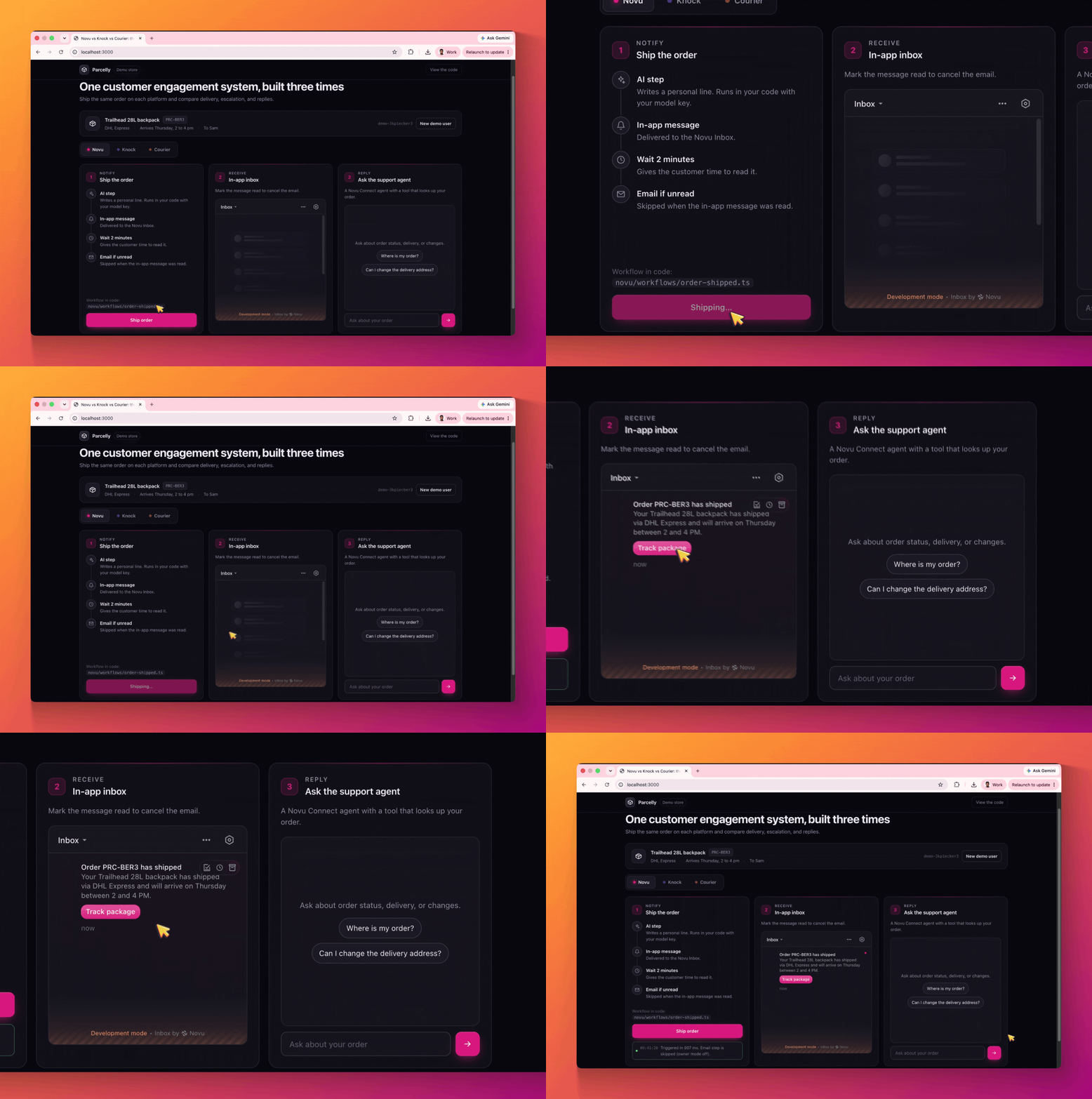
Parcelly ships a Trailhead 28L backpack with DHL Express. When the order ships, the same order-shipped event and payload go to all three platforms, and each runs the same flow:
- An AI step writes one friendly sentence about the shipment.
- That sentence goes out as an in-app message.
- The flow waits two minutes.
- If the customer hasn't read the in-app message, an email goes out. If they have, it doesn't.
Then the customer asks a support agent, "Where is my order?" or any other questions or action they want to take right from their preferred channel.
The app is one Next.js project with a tab per platform. Each tab uses that vendor's own React inbox component and server SDK.
To run it yourself, clone the repo, copy .env.example to .env.local, and add your own keys for the platforms you want to compare. docs/SETUP.md walks through each dashboard. Each tab works on its own, so you can start with one platform.
Round 1: Notify, then escalate only if unread
This is the most common multi-channel pattern there is, and the one that matters most to your users: don't email someone about something they've already seen. I ran it twice on each platform, once leaving the in-app message unread and once reading it straight away.
Novu
The condition is one line in the workflow file. The in-app step returns whether the message was read, and the email step skips itself if it was:
Both runs passed. One snag: Novu's built-in test email provider only sends to the email of the logged-in Novu user, so I connected Resend to send anywhere else.
Knock
Knock gets the same result from the dashboard. You add a step condition on the email step that checks the in-app step's message status:
Both runs passed, and Knock's built-in email channel delivered without a third-party provider. Two catches. The built-in channel only sends to members of your Knock account. And my first version of the condition checked data.read, a field in the trigger payload that never changes, which is an easy mistake to make because data conditions and message-status conditions live side by side in the builder.
Courier
Courier handles this with a condition on the email's send node. In the journey editor, open the Send Email step, add a condition, pick the in-app step, and set it to was not Opened. If the Inbox message was opened during the delay, the email step is skipped.
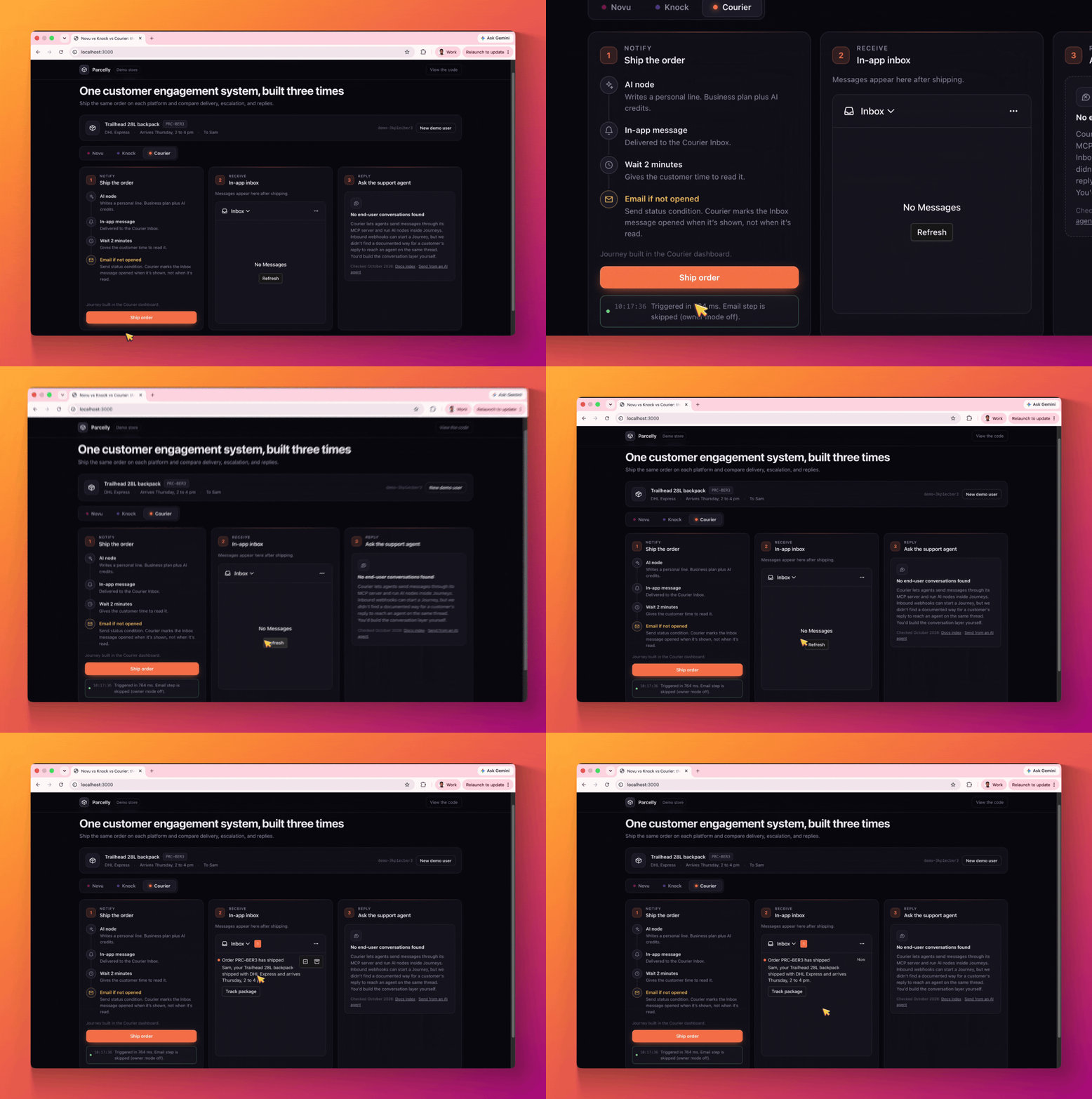
Both runs passed, with one difference in meaning. Courier has no "read" status: the Inbox marks a message OPENED as soon as it's displayed. So the email is skipped once the customer has seen the message, whether or not they read it. Novu and Knock check whether it was read. In my demo the inbox is always on screen, so an arriving message counted as opened right away. If your inbox is visible on most pages, expect Courier to skip the email far more often than Novu or Knock would.
One setup note: the condition lives on the send node, not on a branch, and my first journey didn't have it, so the email went out every time until I added it.
Round 2: AI inside the workflow
All three wrote a good sentence. The differences are where the model runs, who pays for it, and what you can see when it fails.
What each one wrote:
- Novu: "Your Trailhead 28L backpack has shipped via DHL Express and will arrive on Thursday between 2 to 4 pm."
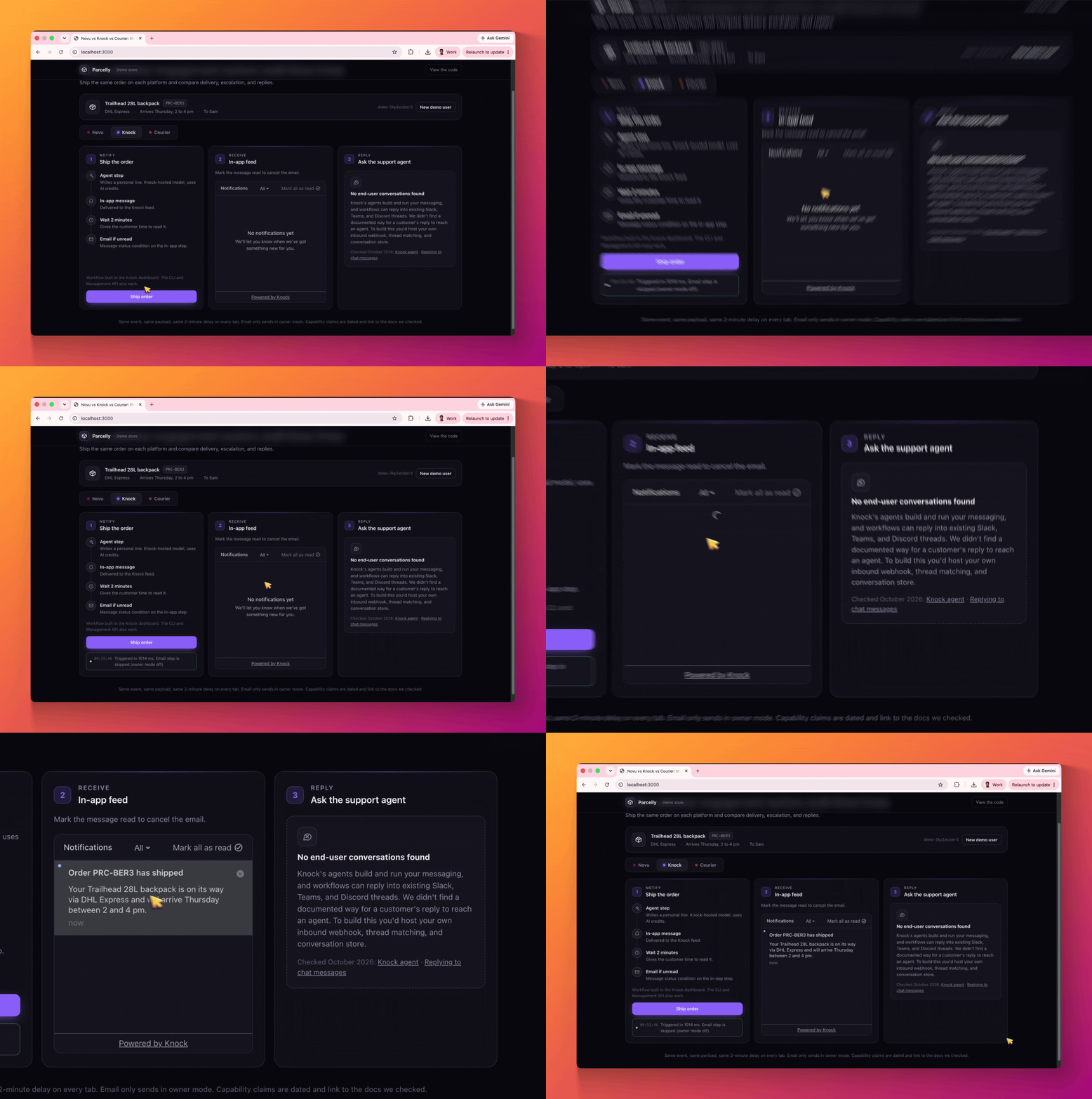
- Knock: "Your Trailhead 28L backpack is on its way via DHL Express and will arrive Thursday between 2 and 4 pm."
- Courier: "Sam, your Trailhead 28L backpack shipped with DHL Express and arrives Thursday, 2 to 4 pm."
Novu: your model, your code
Novu doesn't host a model step. The call runs inside a step.custom in your workflow, with whatever model and SDK you choose, and Novu persists the result so it isn't regenerated on a retry. There are no credits to buy, and you can swap models freely. The trade-off is that you bring the key and own the call.
Knock: hosted, on credits
Knock's agent step is the most turnkey: pick a model in the dashboard, write a prompt, and reference the output as data.personalize.response_text. It runs on Knock AI credits. The free Developer plan lists 500 credits, but my step failed with "Insufficient AI credits available" until I topped up with 500 more, and when it fails, the workflow stops before the in-app message goes out. On the plus side, Knock exposes the prompt and output through its API, which made debugging straightforward.
Courier: hosted, on Business
Courier's AI node isn't available on the free Developer plan; the dashboard shows "Upgrade to use AI in Journeys." I upgraded to Business, and it still failed until I bought a separate AI credit pack. When it failed, the API and MCP server reported only ERROR, with the reason visible only in the dashboard's Logs view.
I also hit two gaps between Courier's docs and what actually worked. Templates needed {{ai_result.line}}, not the documented {{line}}. And prompt variables needed a data. prefix: with {{item}}, the model received the raw placeholders and wrote a generic sentence.
Round 3: Can the customer talk back?
This is where "agentic" stops being about how you build notifications and starts being about what your customers can do with them. A shipping update almost always gets a reply: "Can I change the address?" "Can it come Friday instead?" In most products, that reply lands in a no-reply inbox.
Novu
Novu Connect is Novu's implementation of ACI, Agent Communication Infrastructure: the layer between an agent and the channels where people actually read messages. Novu handles the inbound webhooks, conversation state, identity, and delivery to the right thread. You keep the agent: your model, prompts, and tools. Novu doesn't run the reasoning; it carries the messages.
My support agent is a short file using the Vercel AI SDK adapter, with one tool that looks up the order:
Asked "Where is my order?" through Web Chat in the demo, it answered with the item, carrier, tracking link, and delivery window from the tool.
Two notes. Web Chat replies arrive as Markdown with a "Powered by Novu" link appended, so my custom chat UI needed a Markdown renderer. And I tested the agent through Web Chat only. Novu also documents workflow-assigned agents, where a customer replies to the shipping email or Slack message itself and the agent receives the original notification as context. I didn't run that path for this post.
Knock and Courier
Neither documents a way for a customer's reply to reach an agent, as of October 2026.
Knock's agents work on your side of the product: they build workflows, campaigns, and audiences from a prompt, in the dashboard or from Slack. Knock workflows can also reply into existing Slack, Teams, and Discord threads, but that's outbound: the workflow posts into the thread, and nothing routes the customer's answer back to an agent.
Courier lets agents send messages through its MCP server and run AI nodes inside journeys. Its inbound webhooks can start a journey, but I found no documented way to tie a customer's reply to the original thread and hand it to an agent.
On either platform, you'd build that layer yourself: an inbound webhook per channel, thread matching, a conversation store, and delivery back to the right thread.
Round 4: Can an agent build it?
All three vendors pitch their MCP servers and CLIs as the way agents build your messaging, so I tested that too. I gave Claude and Codex the same prompt for each platform, changing only the platform name:
Using [Novu | Knock | Courier], create a workflow called order-shipped. It should generate one personalized sentence about the shipped item with an AI step, send an in-app message with that sentence and a "Track package" link, wait 2 minutes, then send an email only if the in-app message hasn't been read. Tell me anything you couldn't do.
All three prompts worked
Pricing and plans
From each vendor's pricing page in October 2026:
The pricing unit matters more than the headline number. My flow sends an in-app message and, sometimes, an email. On Novu that's one workflow run; on platforms that bill per message or send, it's up to two.
Where each one wins
Novu is the only one of the three where the customer can reply and reach an agent, which is the part of "agentic" that changes the product for users. It also handled "email only if unread" in one line of code, runs AI on any model with no credits, keeps workflows in your repo, can be self-hosted, and has the lowest fixed price for a paid plan. You pay for that with more setup: a tunnel and a sync for local development, and a model key to manage.
Knock was the smoothest hosted experience. The AI step needs no model key, the unread condition works from the dashboard, the built-in email channel saved a provider setup, and its API made AI steps the easiest to debug. Knock also offers in-app guides and data activation features I didn't test here. Watch the AI credits and the condition builder.
Courier gets you a visual journey builder and a hosted AI node with a choice of frontier models. Its email path worked first time once a provider was connected, and a send condition skips the email once the in-app message has been seen. It also offers an embeddable template designer I didn't test. But the AI node needs the Business plan plus credits, and error reasons are dashboard-only.
Which should you pick?
- Your customers will reply to notifications, and you want an agent to answer: Novu.
- You want workflows in code, reviewed in pull requests, or the option to self-host: Novu.
- Your team prefers a hosted, dashboard-first tool and wants AI steps without wiring a model: Knock.
- You're already on Courier Business and mainly need visual multi-step journeys: Courier.
The fastest way to decide is to clone the repo, add your keys, and ship an order on each tab.
FAQ
What is agentic customer engagement?
Agentic customer engagement uses AI agents across your product's messaging: to build notification flows, to run steps inside them such as writing personalized copy, and to hold two-way conversations with customers on channels like email, Slack, or in-app chat. Novu, Knock, and Courier all use the term, but only Novu currently documents customer replies reaching an agent.
Which is better, Novu, Knock, or Courier?
It depends on what you need agents to do. In my October 2026 test, Novu was the only one where customers could reply to an agent, and it handled "email only if unread" in code. Knock was the smoothest hosted option with built-in AI steps. Courier offered a visual journey builder, with AI steps on its Business plan.
Can Courier send an email only if an in-app message wasn't read?
Yes. In the journey editor, add a condition to the email's send node: the in-app step "was not Opened." Courier has no read status, and its Inbox marks a message opened as soon as it's displayed, so the email is skipped once the customer has seen the message, even if they haven't read it.
Do Knock and Courier charge extra for AI steps?
Yes. Knock's agent step uses Knock AI credits; the free plan lists 500, and I needed more for my test. Courier's AI node needs the Business or Enterprise plan and a separately purchased AI credit pack. Novu runs AI steps in your own code, so you pay your model provider directly.
Can customers reply to an AI agent in Novu?
Yes. Novu Connect, Novu's implementation of ACI (Agent Communication Infrastructure), lets customers chat with your agent through in-app Web Chat, Slack, Microsoft Teams, WhatsApp, Telegram, or email. Novu handles inbound messages, conversation state, and delivery, while your code or a managed agent provides the reasoning.